
See it work
The little things
don’t get a free pass.
Pick an example. See what changed. This is the kind of detail Workbook Compare Pro helps you review.
Baseline.xlsx
| A | B | C | |
|---|---|---|---|
| 1 | Region | Orders | Status |
| 2 | North | 120 | Ready |
| 3 | West | 84 | Ready |
| 4 | South | 96 | Ready |
New output.xlsx
| A | B | C | |
|---|---|---|---|
| 1 | Region | Orders | Status |
| 2 | North | 120 | Ready |
| 3 | West | 89 | Ready |
| 4 | South | 96 | Ready |
B3. There’s your change.
84 became 89. Same place, different value.
An interactive illustration using sample data. See the actual application below.
From the actual application
One order.
One difference.
In this included sample, May’s order count changes from 1,240 to 1,241. The app takes you to cell B7 and shows both versions together.
Try it after installing: open Samples & tour, then choose One changed number.
Try the sample yourself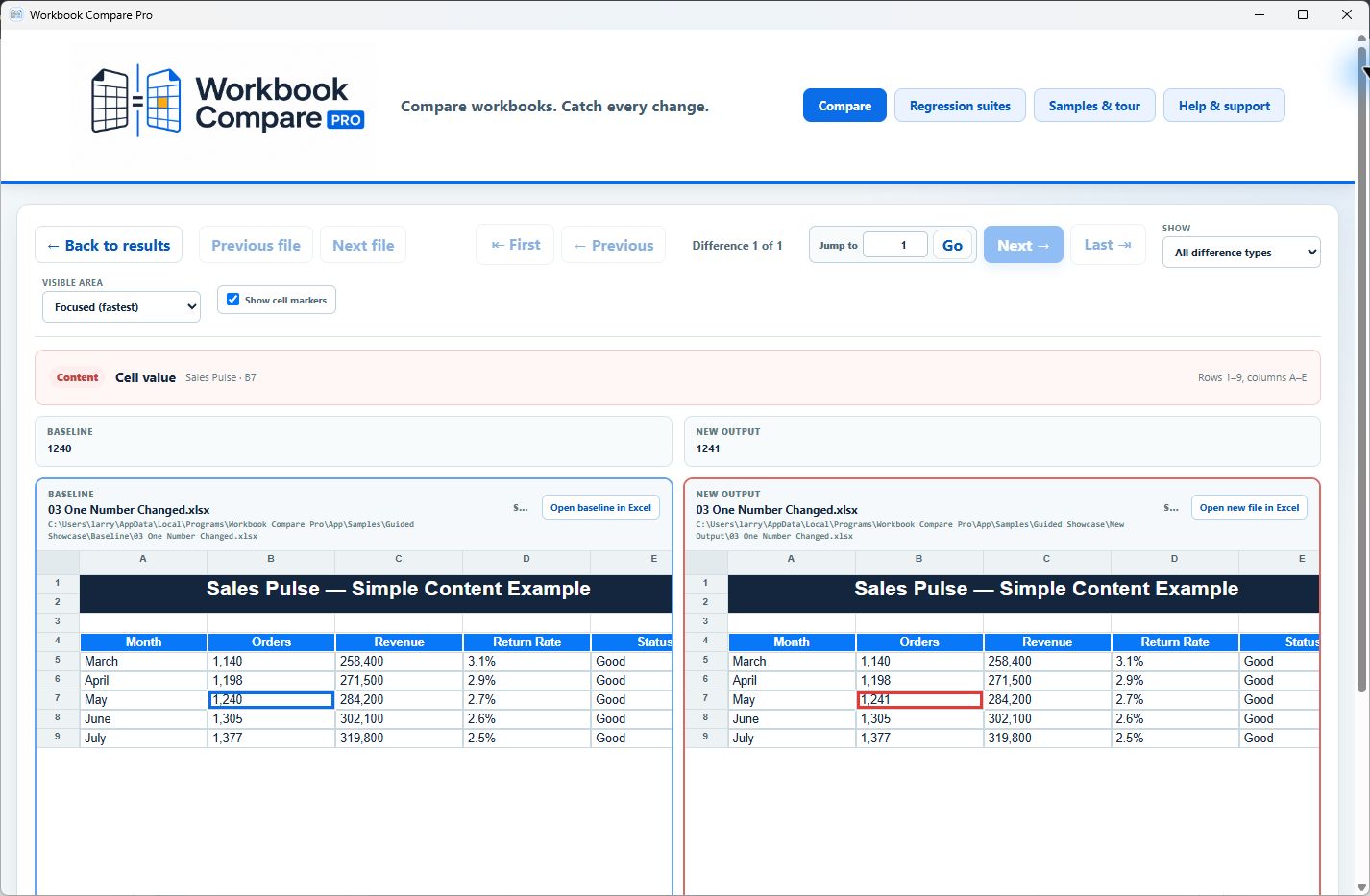
The app also includes a perfect match, a border-only change, CSV and TSV examples, and a full folder showcase. Start there before bringing in your own files.
Your next workbook is a good place to start.